After starting Burn.app You will need to open at least one CD compilation
window to do some serious work. To do so, simply select 'CD compilation'->'New'
from the main menu or the key combination 'Command'-'n'. You will get the
following window:
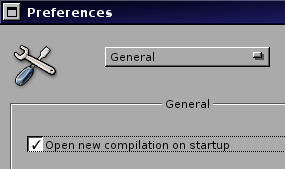
If you want Burn.app to automatically open a new CD compilation window on
start-up, open the preferences panel, and on the 'General' page check the
option 'Open new compilation on startup'.
To successfully burn your CD you must eventually select the appropriate tools,
i.e. the backend software and the burner to use. The menu offers the command
'Tools'->'Burn Tools' by which you can open the panel shown below assisting
you in this task.
After clicking the 'Burn' button in the compilation window burning begins. If
you chose to edit the burning parameters the 'Parameters' panel will pop up
giving you the possibility to customize the process. The figure shows the
'General' settings, which might be the most important ones.
If you use the same burn parameters all the time, you need customize them only
once. They will be saved and thus can be reused later. Simply uncheck the
option 'Open parameter settings...' in the compilation window. Burning will
then start immediately without further interaction.
During the burning process the following panel will appear, giving detailed
progress information about the different stages of the process.